Assign CBM rules to maintenance task
A component structure can be linked to a strategy task by setting the Performance Strategy parameter of the strategy task equal to On Condition.
As a result, the default option of the component structure inherits the scheduling (frequency) and job details (costs) of the strategy task (not vice-versa); which AMT uses for forecasting (not the other way around).
The other occurrence types of the component structure being recalculated proportionally (see example screenshot below).
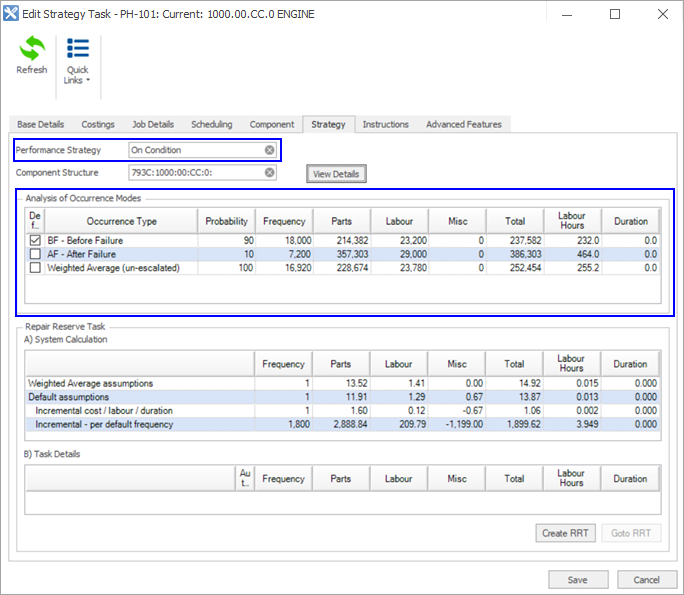
What does linking a component structure to a strategy task do?
- It does NOT change projected costs (the costs from the jobs within the strategy task are still used).
- References maintenance strategy.
- Displays repair reserve requirement.
- Enables component based maintenance.
Interpreted Component Structure
- When a task is linked to a component structure it does not copy the information directly from the component structure, rather it interprets or converts the information.
- The calculation method uses the current pricing, lives in the task and uses the ratios in the component structure to create the failure modes. See an example below.

In the above example:
- The Before failure is the same as the basic data set up in the strategy task, that is, the cost could come from a standard job.
- 9,000 Frequency in the strategy task's Failure Mode 1 is calculated as 7,500/15,000 x 18,000 (component structure failure mode 1 frequency/component structure before failure frequency x strategy task before failure frequency).
- $156,000 in the strategy task's Failure Mode 2 is calculated as 120,000/100,000 x 120,000 (component structure failure mode 1 cost/component structure before failure cost x strategy task before failure cost).
Why calculate it this way?
- It means one component structure can support equipment on different sites with different application severities and costing.
- When there are escalations you do not have to change the component structure.
Instructions
| Field/Panel | Description |
|---|---|
| Electronic Workscopes | Lets you link the strategy task to electronic workscopes which are used in the AMT Client or AMT Mobile. |
| Linked Library Documents | Lets you link the strategy tasks to any documents (PDF, Word) in either the AMT Library or any external document management system. |
Advanced features
| Field/Panel | Description |
|---|---|
| Automated Actions | Lets you generate and create a work order history, external work orders and planned events or work orders. If you select Work Order History, AMT automatically creates completed work order settlements for the strategy task amount. |
| Manual Cost Source | If you select this check box, cost allocations are not added or updated from an external source. This field is only applicable when interfacing AMT with an enterprise resource planning system (this would be the cost allocation cost source). |