Cat SOC Endpoint Administration
SOC Manager provides a settings function which allows users to add, modify and remove endpoints for SOC. The values required to create and maintain endpoints will be provided by Caterpillar. Access to this function is controlled in group permissions with the CAT Service Option Collaborator Endpoint Administration function.
To add or edit an endpoint
The SOC Endpoint Administrator can add, edit, and delete SOC Endpoints.
You need to define SOC endpoints before creating the SOC Profile, importing Standard Jobs (Service Options) and Parts and Parts Prices (when pricing has been added to the Caterpillar SOC server).
-
On the SOC Manager screen, click
 . The CAT SOC Endpoint Administration screen displays.
 -
Click Add SOC Configuration.
All fields are required on the Add SOC Endpoint Details screen.
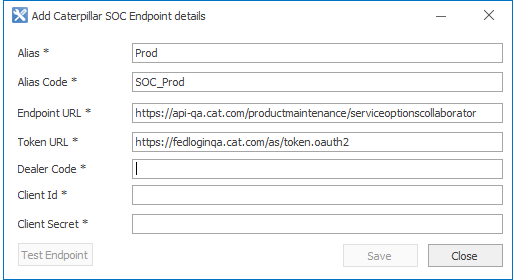
Field Description Alias Text field that can be used in logging, reporting and so on, for example, Prod. Alias Code Used as a source when identifying where the loaded standard jobs were imported from, for example, SOC_PROD. Limited to 10 characters. Endpoint URL The actual address to be used when calling the web services. Token URL The SOC URL to generate the token. Dealer Code The code for the Dealer, provided by CAT. Example T080. Client ID and Client Secret These fields are provided by CAT to the Dealer and are passed to the Token URL to get the Token. The Token will be passed to subsequent requests to SOC Endpoint URL. - Once the fields are populated, validate the fields by clicking Test Endpoint.
- Click Save. The Caterpillar SOC Endpoint Administration screen displays.
- Close the window.