Create strategy tasks from standard jobs
AMT has the ability to create strategy tasks from standard jobs. However, there are some requirements which the standard job must adhere to.
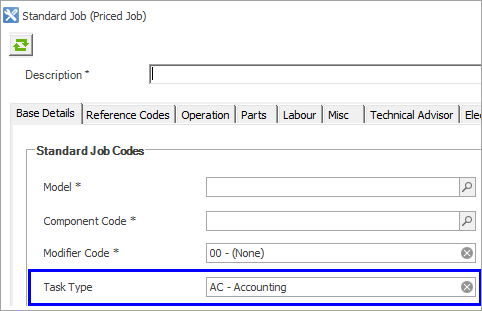
- On the Base Details tab, the Task Type must be selected.
 Create Work Order Settlement History
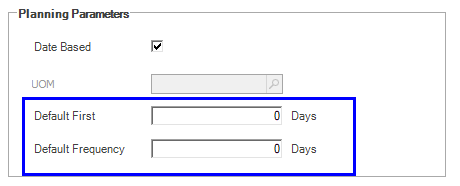
On the Reference Codes tab:
- the Default First and Default Frequency fields must be greater than zero.
The standard job import function and standard integration functions let you set some extra parameters on the standard job for creating a strategy task from a standard job. These fields can only be set via the import or integration functions and are not visible in the AMT Client:
-
PlanningTask is a flag. A value of 0 creates a non-planning strategy task and a value of 1 creates a planning strategy task.
-
LeadDays defines the planning lead time. This is required to be non-zero if the PlanningTask flag is set to 1 for a planning strategy.
-
NotAfter is a usage which defines that the strategy should not occur after this usage.
When the above fields are not set on the standard job via the import process or integration, AMT makes some assumptions when creating projected tasks from standard jobs, such as:
-
not flagging the Task as a Planning Task.
-
not setting any Lead Days.
-
setting Not After to zero.
The Cost Bearer will be set to the default Cost Bearer and the strategy task Currency will default to that of the standard job, however it can be overwritten.
Therefore, additional configuration of the strategy task has to be done manually using Strategy Task Manager, Editable Strategy Task Manager, or using the multi-editors.