Daily Planning
Planning
The Planning form is designed to enable various stakeholders in the planning process to perform all AMT-related planning tasks within this form.
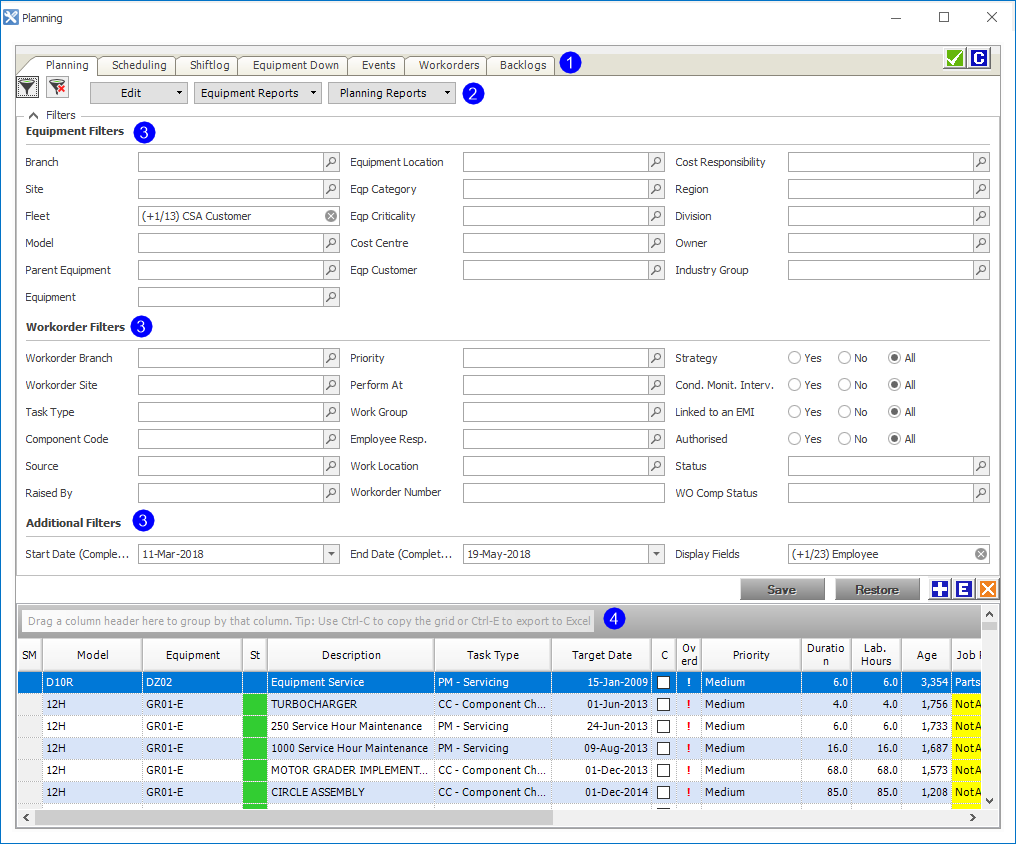
The screen is divided into four sections.
- Functions: Planning, Scheduled, Shiftlog, Equipment Down, Events, Work orders and Backlogs.
- Menu options: Edit, Equipment Reports, Planning Reports.
- Filters: Equipment, Work order and Additional.
- Grid: contains the data you filtered for.
AMT has two Planning modes:
- Standard - suited for applications where downtime is not captured such as general line, PM contracts, process plants, workshop and so on.
- Advanced - mining focused and suited for downtime capture applications as it integrates with the Equipment Status module.
Navigate to Daily Planning > Planning.
| Tab | Description |
|---|---|
| Planning | The Planning grid shows all planning work orders - both strategy work orders (components and PMs) and defects. |
| Scheduling | The Scheduling Gantt Chart graphically represents a plan and allows you to manipulate the plan, allocate additional backlogs, workgroups and employees to the plan using drag-and-drop. |
| Shiftlog | Shows events within a specified date range and is designed to quickly update the event status and create unplanned events with only the essential information. |
| Equipment Down | Graphically represents the live status of assets. Over a specified period of time all yet to start, in progress and completed events can be seen in a timeline. |
| Events |
Enables you to create detailed events with the respective work order. When adding work orders to the Events tab, if they don't have the same shutdown, turnaround, outage (STO) as the Event STO there will be an error and the work orders will not be added. |
| Workorders | Lets you review all planning work orders with additional details such as admin alerts. |
| Backlogs | Lets you review all planning work orders with the ability to generate backlog-specific reports. |
 Related Topics