Create a new Question
Within a Folder, click + and select Create New Question.
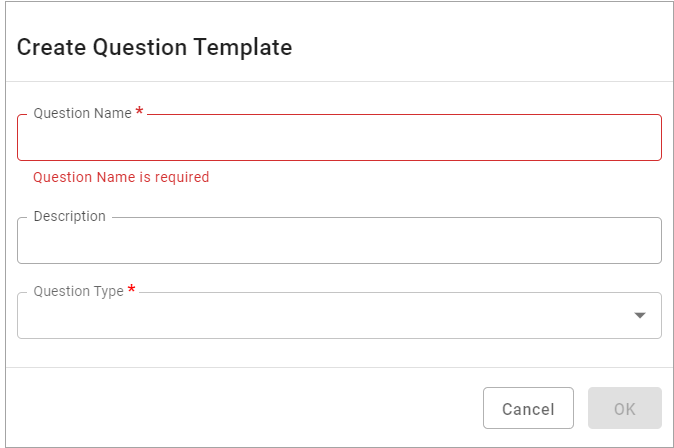
The Question Type is a dropdown and gives a list of all the standard system Question Types provided:
-
Checkbox
-
Number
-
Signature
-
Date and Time
-
Drop Down
-
Measurement
-
Unit of Measurement
-
Yes/No
-
Yes/No/NA
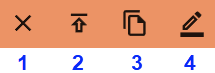
In the Question Preview (middle panel), icons allow the Question to be managed. These icons change depending on the status of the Question.
Status = In Design
 s
s
| Item | Description |
|---|---|
| 1 | Deletes the Question; the current version of the Checklist is In Design. |
| 2 | Stages the Question for Publishing (see Staging and Publishing Process). |
| 3 | Allows a copy of the Question to be created. |
| 4 | Allows the Question to be modified. |
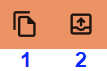
Status = Staged for Publishing
| Item | Description |
|---|---|
| 1 | Allows a copy of the Question to be created. |
| 2 |
Allows the Question to be reverted from the Stages status back to In Design. |
Status = Committed

| Item | Description |
|---|---|
| 1 |
Allows one or more Questions to be committed. Committing questions will update all the Checklist Templates referenced on the Questions. Once committed, the icon disappears from the panel. It will re-appear when additional Questions have been Staged for Publishing. When a Question is ready for commitment, it has a blue dot as an indicator next to its Question Type icon. |