Activity area dependencies
Dependencies control the order in which activities can start, so the schedule follows a safe, practical mining sequence. In practice, they stop a successor task (for example, Mining) from commencing until its required predecessor tasks (for example, Drill and Blast) have progressed sufficiently or finished. This prevents operational conflicts, keeps people and equipment safe, and helps ensure the plan reflects how work must proceed in the field.
Why dependencies are important
Dependencies keep the schedule realistic and safe by preventing overlapping tasks that would violate site rules or physical constraints. They reduce the risk of unsafe conditions, eliminate clashes between activities on the same ground, and still allow planners to accelerate the cycle where it’s safe to do so—such as letting charging begin once a portion of the drilling is complete—so the plan remains both compliant and efficient.
Find dependencies
To set up dependencies between activities:
-
Go to Config > System Management > Activities and use the dependencies functionality.
These settings affect all activity areas of the given activity type.
-
Go to Client and, in Properties > Dependencies, override the dependency functionality for the plot-selected activity areas.
Set up dependencies for an activity
To set up dependencies for an activity
-
Go to Activities to prepare global dependencies – or Client for specific dependencies.
-
For global dependencies, select an activity on the list.
-
For specific dependencies, select an activity area in the scene, then go to Properties > Dependencies subtab. Enable Override Activity Area Sequence.
Keep in mind, you are setting up predecessor activities for the selected activity.
-
-
Optionally, enter a Bench to Bench Overlap Tolerance (m2) value, to specify how much each activity area must vertically overlap to establish dependencies between them.
-
On the table, select each activity that should be a predecessor.
-
Optionally, for each selected activity, specify Method, Offset, and Overlap Tolerance properties, to refine how the dependency unfolds in the mining sequence.
Validate dependencies
You can review the dependencies for a selected activity area in Client > Activity Areas > Dependencies. This view helps confirm which predecessor activity areas or slices must be completed before the selected activity area can start.
The Dependencies table lists all relevant predecessors in the order they will be mined. What you see depends on the dependency method:
-
If the method is Slice Offset, the table shows each predecessor slice in mining order.
-
If the method is Whole Area, the table lists entire predecessor activity areas.
For example, if you select a Charging activity area and its predecessor is Drilling, the table will show the drilling activity area—or its slices—depending on the method.
The table also includes a filter function, so you can quickly search for specific predecessor slices or areas.
How to validate the sequence
Validating the mining sequence ensures that the schedule respects the configured dependencies between activity areas. This process confirms that successor tasks (e.g. Mining) only begin once their predecessor tasks (e.g. Drill, Charge, Blast) have progressed sufficiently or are complete, according to the dependency method and overlap tolerances.
To validate the dependency sequence
-
Open the Gantt chart (go to Client > Gantt)
This chart visually represents the schedule, showing when each activity area is performed and by which resource.
-
Play the schedule animation.
Use the playback tools to animate the schedule. As the animation progresses, observe the sequence of tasks across benches and activity areas. The play bar scrolls through the timeline, helping you track when each task begins and ends.
-
Observe dependency delays.
Look for Dependency Delay bars in the Gantt chart. These indicate that a resource is waiting for a predecessor activity to finish before starting the successor task. These delays confirm that the dependency rules are being enforced.
-
Check sequencing of overlapping activities.
For overlapping activity areas (in both XY and vertical dimensions), ensure that:
-
The predecessor activity is completed (or sufficiently progressed) before the successor begins.
-
The method used—Whole Area or Slice Offset—is reflected in the timing and overlap of tasks.
-
-
Review slice-level progression.
If using Slice Offset, validate that successor slices unlock progressively as predecessor slices are mined. This staggered start should appear as a cascading effect in the Gantt chart.
-
Confirm overlap tolerances.
Ensure that dependencies are only created where valid overlaps exist (following Activity Overlap Tolerance and Bench Overlap Tolerance).
-
Use the Dependencies tab for detailed review (Client > Activity Areas > Dependencies).
-
Identify bottlenecks and adjust.
Use the Gantt chart to spot idle periods caused by dependencies. If delays are excessive, consider adjusting upstream activities, overlap tolerances, or dependency methods to improve flow.
When activity areas can be dependent
Dependencies only apply when activity areas overlap in plan view (XY) and overlap vertically across benches. If two areas do not overlap, the dependency does not apply, and both activities can run in parallel.
You can configure tolerances to ignore tiny or accidental overlaps that shouldn’t affect the progression of scheduling an activity.
Dependencies across mining levels
Dependencies apply when two activity areas overlap in plan view (XY). The successor must be on the same or a lower mining level than the predecessor. An activity on a lower level cannot act as a predecessor.

Two overlapping activity areas: a Drilling activity area (red) and a Mining activity area (green). As the Mining activity area is on a lower bench, it must be a successor by nature – and the Drilling can be the predecessor to it.
Method
When there is a dependency, whereby the below activity area is the successor to the above activity area, there are two ways this dependency can be scheduled.
The dependency can be either:
-
Staggered: Slices in the successor can be scheduled once the immediately above slices in the predecessor are complete, allowing staggered starts for faster cycles. You can also apply an offset so the successor waits for additional slices beyond the immediate ones.
-
Whole: The successor waits until the entire overlapping predecessor activity area is complete before starting. Use this for strict, safety-critical sequences.
You determine this approach by selecting a method.
Whole area
The Whole Area method enforces a strict sequence: the successor activity area cannot begin until the entire overlapping predecessor area is finished. This approach is typically used for safety-critical operations, such as ensuring all blasting is complete before mining starts.
The Gantt chart will show a clear gap between predecessor and successor tasks, with no overlap allowed.
Example
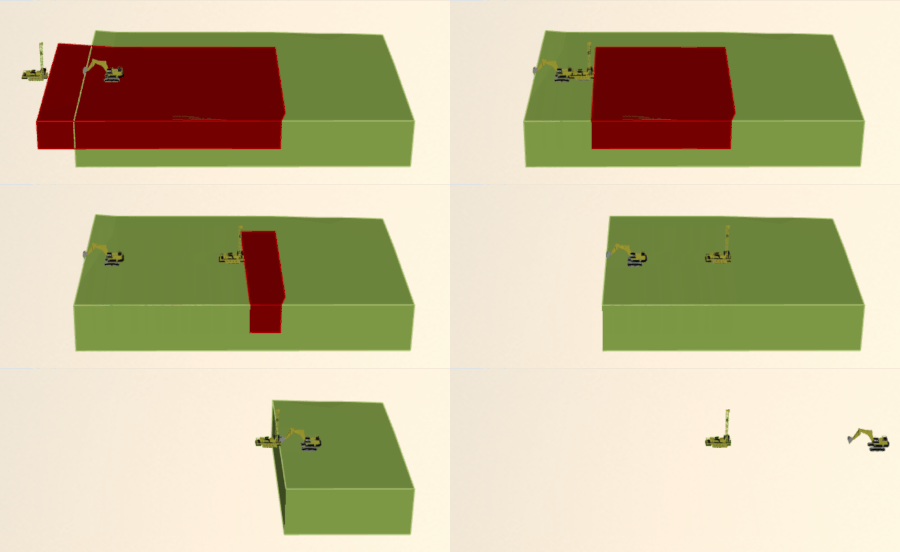
Before the lower overlapping Mining activity area (green) can be completed, the above Drilling activity area (red) must be fully scheduled. As drilling is a non-mining activity, it must be completed entirely to release the successor.
Effect on the Gantt chart
On the Gantt chart, dependencies appear as Dependency Delay tasks. These delays represent the time a resource must wait before it can begin working on an activity area that is still blocked by its predecessor. This visual cue helps planners understand why certain tasks are idle and ensures that the schedule reflects realistic sequencing. It also allows planners to identify bottlenecks and adjust upstream activities to improve flow.
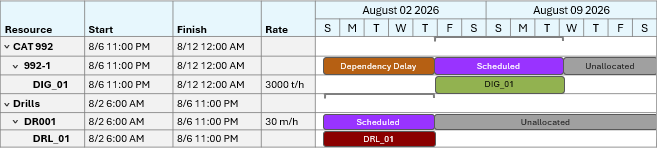
A simplified Gantt view demonstrating the dependency sequence between both activity areas.
Slice
The Slice method applies the dependency at the slice level. Instead of waiting for the entire predecessor area, successor slices can start once the immediately above slices in the predecessor are complete, allowing staggered starts that reduce idle time and improve equipment utilisation.
You can optionally specify the Offset (slices) value to control how many slices must be mined before the successor can start.
The Gantt chart will show overlapping tasks, with the successor gradually unlocking as slices are released. For instance, Mining begins after two slices of blasting are complete – even if the rest of the blast area is still in progress.
Examples
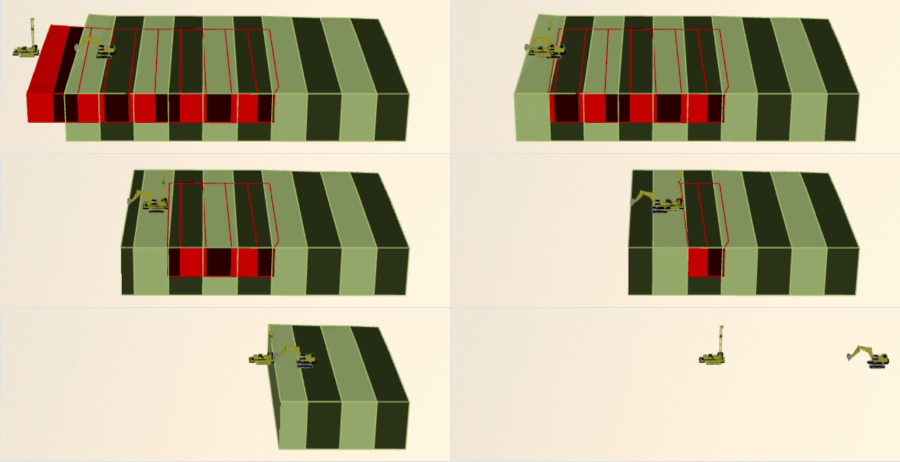
[GIF] Two overlapping mining activity areas (Mining: green, and Drilling: red) on adjacent benches. The lower successor bench slices become available as the corresponding upper bench predecessor slices are mined.

Each slice on the lower bench points to its predecessor slice on the bench above. Without considering offsets, a slice is a predecessor if it’s immediately above the successor slice (above mining level, within the XY surface area).
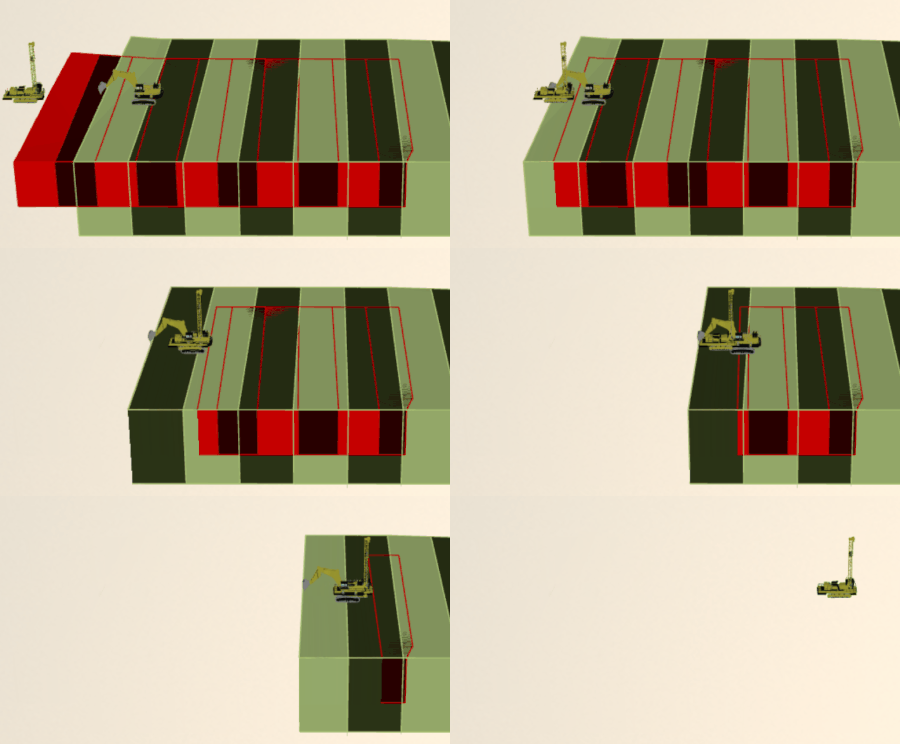
[GIF] An alternate scenario with slower production rates to make the dependency effect easier to visualise.
Offset
The slice offset controls how far below the immediately above slices the dependency extends.
If Offset = 0, the successor slice can start as soon as the overlapping slice directly above it is mined.

The selected successor slice points to its predecessor slices, which are immediately above it.
If Offset = 2, the successor waits until two additional slices beyond the immediately above slices (in the mining direction) are mined.

The selected successor slice points to its predecessor slices identified by the Offset
If Offset = 3, the successor waits until three additional slices are mined, and so on.

The selected successor slice points to its predecessor slices identified by the Offset
Effect on the Gantt chart
On the Gantt chart, dependencies appear in segments at the slice level. These delays represent the time a resource must wait before it can begin working on a slice that is still blocked by its predecessor slice on the bench above.
Unlike whole-area dependencies, this approach allows a staggered start: as soon as an upper-bench slice is mined, the corresponding lower-bench slice is released and scheduled. This creates a cascading effect in the Gantt chart, where tasks for the lower bench gradually unlock rather than waiting for the entire upper area to finish.
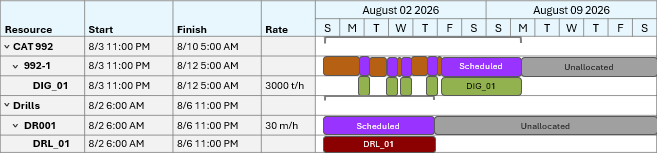
A simplified Gantt view highlighting the dependency sequence between upper and lower bench slices.
Activity overlap tolerance
The activity overlap tolerance controls how much two activity areas can overlap on the XY plane before a dependency is created. This is useful for preventing small or unintentional overlaps from holding up the mining sequence.
In this example, the two activity areas have an overlap of 617 m².
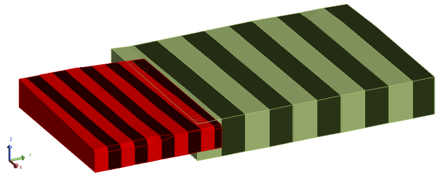
The drilling (red) and mining (green) activity areas overlap
If there’s no overlap tolerance set, or if it’s below the actual overlap area, the drilling must finish before the mining activity area can start.
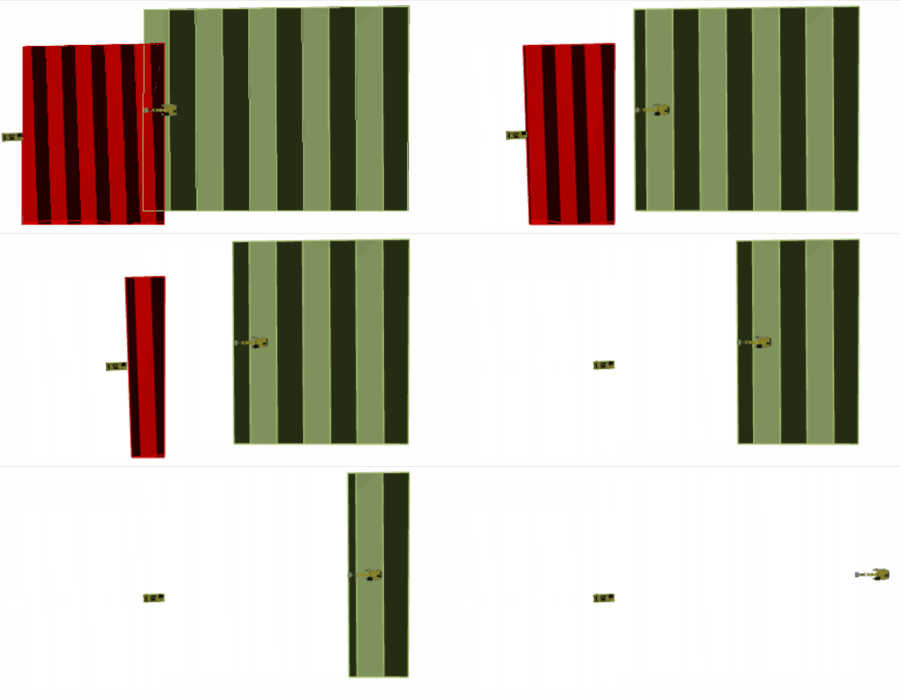
[GIF] In this scenario, the tolerance is below the actual overlap – so there is a dependency
If you set the tolerance to any number above the overlap (like 650), the software doesn’t create a dependency – so both activities can be scheduled without waiting.
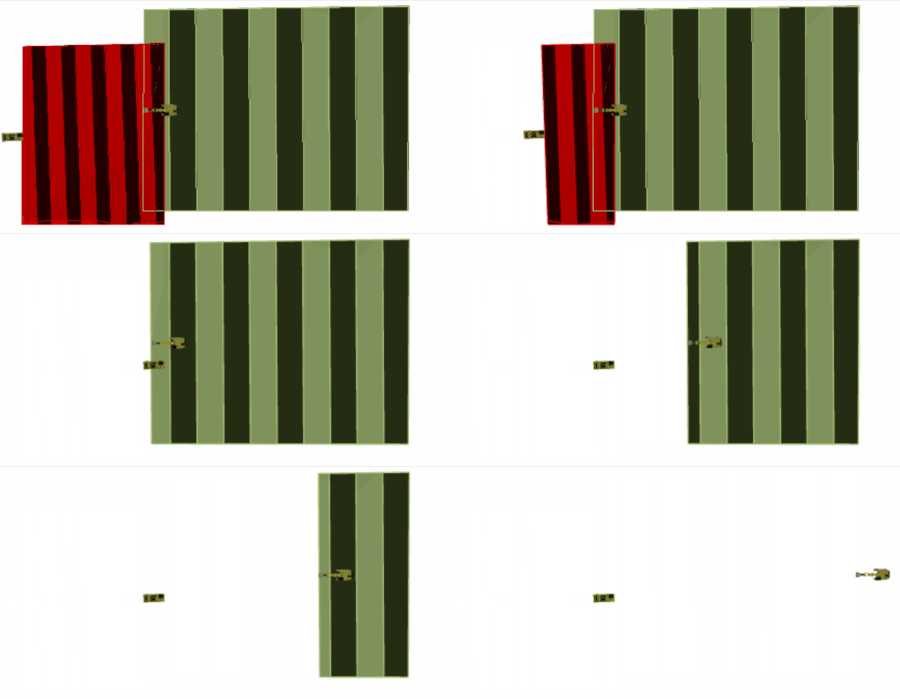
[GIF] In this scenario, the tolerance is above the actual overlap – so there is no dependency
Bench overlap tolerance
The bench-to-bench overlap tolerance controls how much two activity areas on adjacent benches can overlap in plan view before a dependency is created. It stops tiny vertical overlaps—often caused by grade control conversions or geometry rounding—from creating unnecessary dependencies.
Mining level matters
The mining levels of overlapping activity areas determine whether dependencies can occur.
When two activity areas horizontally overlap:
-
An activity area on a lower mining level can be a successor to an activity area on an upper mining level.
-
An activity area on a lower mining level cannot be a predecessor.
-
If both activity areas are on the same mining level, either can be the predecessor or successor.
This means that when you select predecessors for an activity, the other activities must occur on the same or an upper mining level for the dependency to be valid.
Example
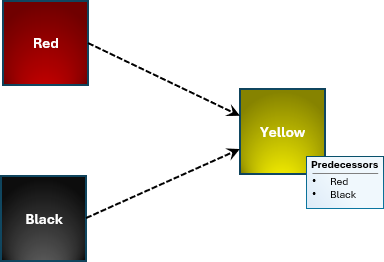
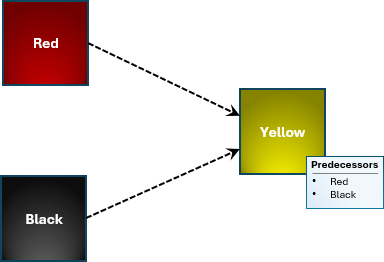
Activity Yellow is configured with two predecessors: Red and Black.
While horizontally overlapping, if Yellow’s mining level is the same or below the other activity areas’ levels, the dependencies are established.
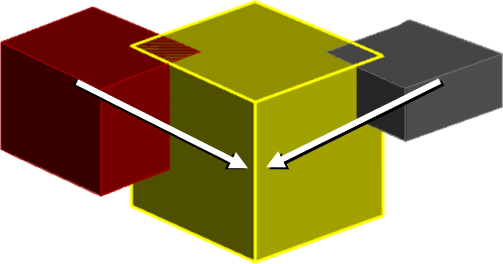
The predecessor activity areas point to their successor
If a potential successor (Red or Black) has a mining level below Yellow, it cannot be a successor.
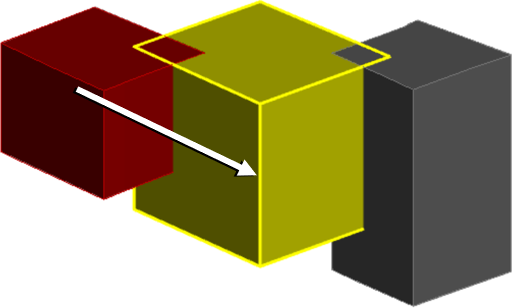
As Black’s mining level is below Yellow, Black cannot be a predecessor
Digging down (automatic dependencies)
If an activity area moves material (Moves Material: Yes in Activities) and is below another overlapping activity area, the software automatically creates dependencies.
These automatic dependencies occur at the slice level, where the below slice is released when the immediately above slices are mined.
These automatic dependencies prevent undermining. As they are automatic, you don’t configure them. You can check the automatically created dependencies using the validation function (refer to Validate dependencies below).
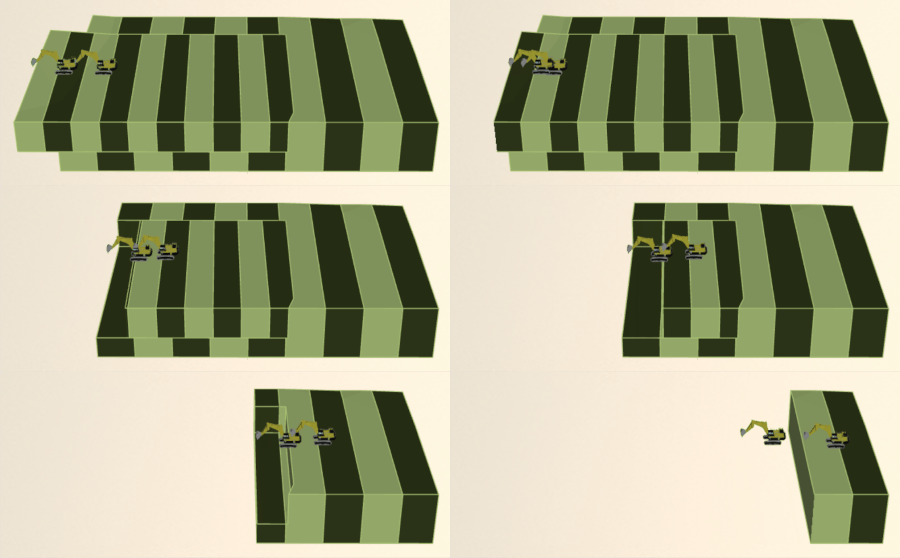
[GIF] Two overlapping mining activity areas on adjacent benches. The lower bench slices become available as the corresponding upper bench slices are mined.

A simplified Gantt view highlighting the dependency sequence between upper and lower bench slices.
Enable this dependency
This dependency is enforced automatically, so you don’t need to set it up anywhere.
Multiple predecessor activities
You can add more than one predecessor activity for a single activity type. This means an activity can depend on multiple other activities, and XECUTE will create dependencies wherever valid overlaps exist.
When multiple predecessors are enabled:
-
The successor activity can only start when the dependency rules for each predecessor are satisfied.
-
If a predecessor uses Whole Area, the successor waits until that entire area is complete.
-
If a predecessor uses Slice Offset, the successor can start slices as soon as the required slices in that predecessor are complete (including any configured offset).
-
Example
The diagram below represents a scenario where an activity has only one predecessor.
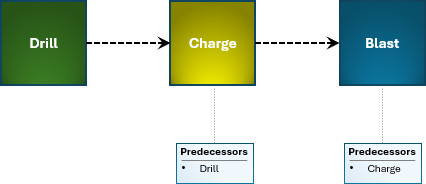
Before Blast can occur, Charge must occur. Before Charge can occur, Drill must occur.
You can define multiple possible predecessor activities.
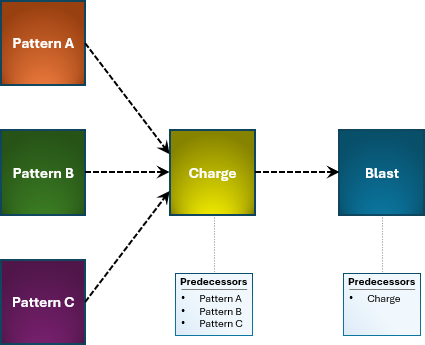
In this scenario, the Drill activity is split into three different drill patterns.
Dependencies are created only where overlaps exist.
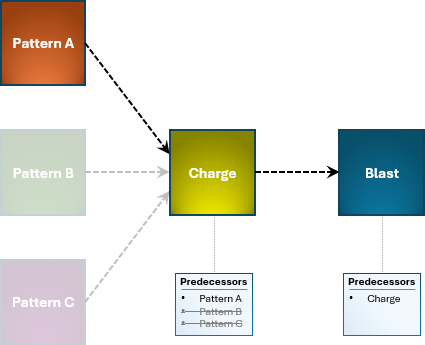
In this scenario, Charge has only one predecessor – because it overlaps with only Pattern A. Blast still has one predecessor: Charge.
If there are multiple overlaps, both predecessors must be completed to move onto the next activity.
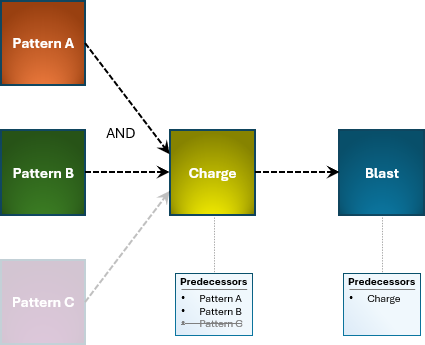
In this scenario, Charge has two predecessors – because it overlaps both Pattern A and Pattern B. This creates an “AND” dependency, where both predecessors must be completed to release the successor.
Different combinations of methods
When an activity area has several predecessors, each predecessor can use a different method (Whole or Slice). In a mixed-method scenario, some slices of the successor may start early (based on slice-level predecessors), while others remain blocked until all whole-area predecessors are finished.
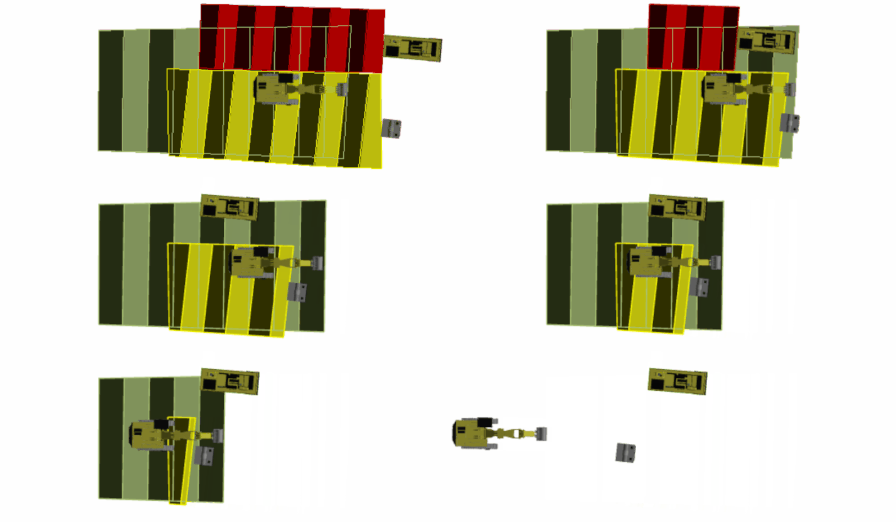
As soon as Red is scheduled using the Whole Area method,
Green’s successor slices can be released with Yellow’s Slice method.
Dependency chain
You can create a sequence where several overlapping activities depend on each other using different dependency methods.
Example scenario
There are four overlapping activity areas representing the process:
Drilling > Charging > Blasting > Mining
-
Drilling > Charging: Charging can start incrementally as drilling progresses (Slice Offset).
-
Charging > Blasting: Blasting must wait until charging is fully complete (Whole Area).
-
Blasting > Mining: Mining must wait until blasting is fully complete (Whole Area).
This combination allows some activities to overlap for efficiency while enforcing strict rules where safety is critical.
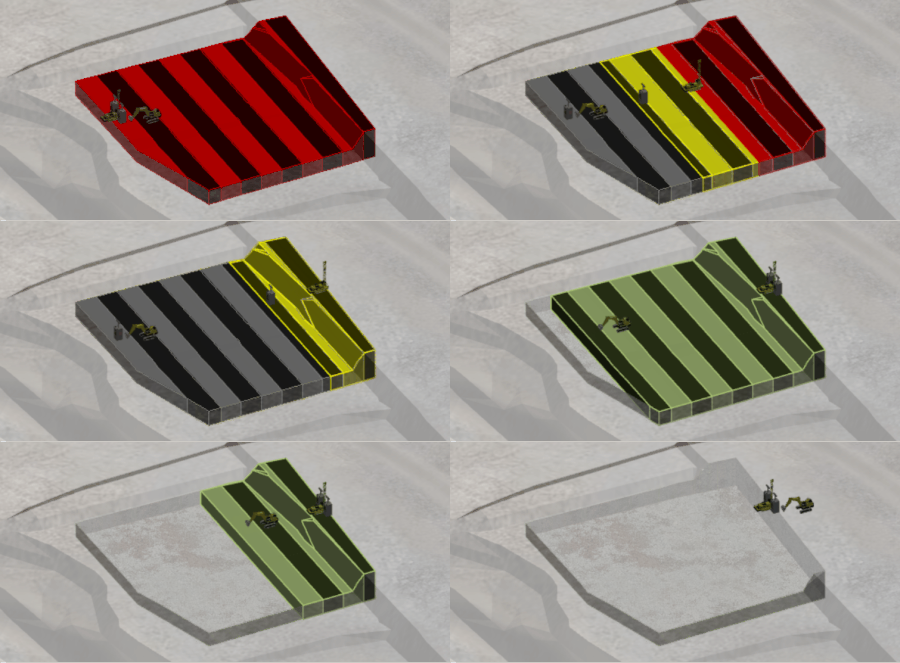
Drilling (red) and Charging (yellow) overlap using Slice Offset. Blasting (black) and Mining (green) enforce Whole Area completion.
Progressive charging during drilling is common on many sites, but only under strict exclusion zones and controls. XECUTE models this with Slice Offset and configurable offsets.
Blasting and mining require full completion and clearance before proceeding. XECUTE enforces this with Whole Area and supports clearance delays using Dependency Delay or Earliest Start Date.
Configuring dependency behaviour
You can set up an activity’s dependencies (its predecessor activities) in Config > System Management > Activities. When you configure dependencies here, they apply globally, affecting all activity areas of that type across all sites. Each activity area inherits these dependency settings by default.
For edge cases or special scenarios, you can override the global settings in Client > Activity Areas tab. This lets you apply custom dependency rules to individual areas without changing the global configuration.
At either location, you can configure how dependencies behave for overlapping activity areas on the same bench (on-bench sequencing) or across benches. These settings determine whether the successor waits for the entire predecessor area or can start earlier using slice offsets.
Select predecessors
The Predecessor table lists all potential predecessor activities for the selected activity type. Each row represents one possible predecessor.
To enable a dependency:
-
Select the checkbox for the activity you want as a predecessor (for example, for Mining, you might select Drill and Blast).
-
Configure the properties in that row (method, offset, and overlap tolerance).
Dependency overrides
Sometimes, you need to make an exception, such as when a specific activity area requires a different sequence or tolerance. In these cases, you can override the global settings for that activity area in Client > Activity Areas tab > Dependencies subtab. This is useful for operational exceptions, temporary adjustments, or testing alternative sequences.
To override an activity area
-
Select the activity area in the Activity Areas tab.
-
Switch on Override Activity Area Sequence on the Dependencies subtab.
-
Adjust the dependency properties for that activity area.
When overrides are active:
-
You can enable or disable specific predecessors.
-
Adjust other properties.
-
Overridden values are clearly highlighted, so it’s obvious what differs from the global configuration.
To revert, switch off the override toggle and the activity area will return to the global dependency settings.