Define materials
Materials group blocks from the block model into categories, such as ore, waste, or grade bins. These categories are defined by rules: if a block meets the rule, it’s assigned to that material. In other words, parts of the geology are considered a certain material when they satisfy the rule’s criteria.
Principal fields then describe the outcomes for each material. For example, if you have principal fields like Mass, Volume, and Au, XECUTE calculates those values for every material in a block, slice, or activity area. The materials you define should reflect what you need to track and report on, whether that’s coal vs waste or more detailed grade splits.
Materials underpin the reserving process. At any level—block, slice, or activity area—you can see which material is present and the associated principal field values. Because of this, materials should be defined immediately after principal fields, especially when setting up a new project.
Open materials setup
In Config, go to System Configuration  > Materials
  .
.
How materials work in XECUTE
When you set up materials, the first step is to create a list of material categories. For example, HGOx, HGSx, LGSx, or simply Ore and Waste. These appear in a list (or tree) in the order you define them.
For each material, you then define a Boolean expression. This expression is a condition evaluated against each block in the block model. For every block, the expression returns either True or False. If the expression returns True, that block is assigned to the material. In other words, the rule describes the condition a block must meet to belong to that material.
If a block meets the rules for more than one material, XECUTE assigns the block to the first material in the list. As such, the order of materials matters: place the most specific materials at the top and broader categories (like Waste) at the bottom.
Swell factor and volume
Each material can carry a Swell Factor.
When material is mined, XECUTE applies the swell to in situ volume (Volume) field and stores the loose volume in a new Volume_Swollen field. Use this when downstream handling needs to report on loose volumes (for example, truck payload planning or stockpile capacity checks).
Swell factors vary by material type. For example, in an open-cut coal mine:
-
Coal often uses a factor close to 1.0 (minimal expansion – relatively soft and doesn’t expand much when basted).
-
Waste rock might use 1.25 (greater expansion after blasting – swells more when broken).
Example
If a block has an in-situ volume of 100 m³ and the swell factor is 1.25:
Volume_Swollen = Volume × Swell Factor
Volume_Swollen = 100 × 1.25 = 125 m³
This means the material will occupy 125 m³ after blasting and excavation.
How to define materials
Create and manage the list of materials used for block classification.
To add a material
-
Open Config > Materials.
-
Click Add.
-
Enter a name (for example, HGO, LGO, Waste).
-
(Optional) Set a swell factor.
-
Enter an Expression that evaluates to True for blocks belonging to this material.
-
Click Save (or Save and New to add another).
To remove a material
Select the material and then click Remove.
Removing a material
Deleting a material runs dependency checks. If deletion would cause an invalid configuration, the action is blocked. Download the Copy Usage report to review where the material is referenced.
There is no undo.
Deletion is blocked when the material is used on the material flow diagram.
Deletion requires confirmation (not blocked) when referenced by:
About the expression
Expressions determine which blocks belong to each material.
-
You create a list of materials (e.g., HGOx, LGOx, Waste). For each material you define a Boolean expression (rule) that returns True or False for every block.
-
If a rule associated with a material returns True for a block, the block is allocated to that material.
-
-
An expression can reference principal fields to help evaluate each block.
Example: Au < 0.3 could assign a block to a low-grade material.
-
XECUTE evaluates materials from top to bottom. If a block satisfies multiple rules, it is assigned to the first matching material.
Order matters: put the most specific, highest-value materials at the top; broad categories (for example, Waste) at the bottom.
-
To avoid ambiguous allocations, make rules mutually exclusive and collectively exhaustive where practical.
-
An expression can include operators, paratheses for grouping, functions, and principal fields to create conditions.
Assign to activities
After defining materials, you can allocate them to activities to control how they are mined in the schedule. For example, you might group multiple materials under one mining activity or keep them separate for selective mining.
This allocation determines:
-
Which activities (tasks) are created for each extracting the materials
-
How those activities are assigned to resources/equipment for execution in the schedule
For full details on configuring activities, see Define activities.
How do I determine my materials and block allocations?
Start by understanding what’s in your block model and what you need to report or schedule. This usually involves:
-
Reviewing block model attributes: Check which fields are available (for example, grades, oxidation codes, lithology, density). These fields form the basis of your material rules.
-
Identifying reporting and scheduling requirements: Decide which material categories you need to track separately, such as ore vs. waste, high- vs. low-grade, or different ore types.
-
Defining classification logic: Use the available fields to create Boolean expressions that reflect your site’s cut-offs and business rules. For example: OxCode = oxide AND Au >= 0.5 for high-grade oxide ore.
Material allocation by oxidation state and gold grade
In this example, an open-pit metals mine contains high- and low-grade oxide (HGOx, LGOx), sulphide (HGSx, LGSx), and acidic waste (NAG, PAG) materials.
To allocate materials to blocks in the block model, each material has a rule that evaluates:
-
Oxidation code (OxCode): identifies whether the block is oxide or sulphide.
-
Gold grade (Au): determines high, low, or waste classification.
The materials and associated expressions are shown below.
(Order matters: place high-grade rules first, then low-grade, then waste.)
|
Material |
Expression |
Explanation |
|---|---|---|
|
HGOx |
OxCode = "oxide" |
|
|
HGSx |
OxCode <> "oxide" |
Non-oxide blocks with Au ≥ 0.5 ppm |
|
LGOx |
OxCode = "oxide" |
Oxide blocks with Au between 0.3 and 0.5 ppm |
|
LGSx |
OxCode
<> "oxide" |
Non-oxide blocks with Au between 0.3 and 0.5 ppm |
|
NAG |
OxCode
= "oxide" |
Oxide blocks with Au < 0.3 ppm |
|
PAG |
OxCode
<> "oxide" |
Non-oxide blocks with Au < 0.3 ppm |
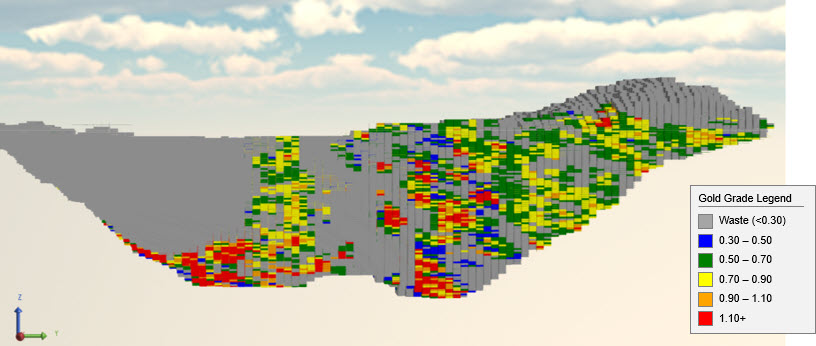
The block model, split by a cutting plane, is shown below. The legend displays the gold grade of each block, which, together with the oxidation state flag, determines material assignment.
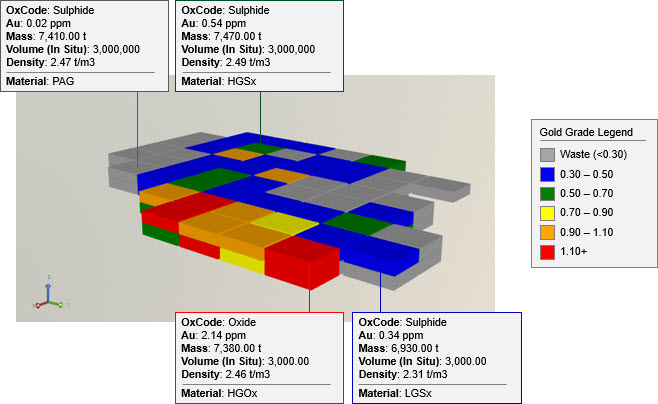
The attributes of selected blocks and their assigned materials are shown below. Comparing these values to the expressions illustrates how each block is classified.
Validate material assignments
To confirm that blocks are allocated to the correct materials, use the block model filter within the Client site settings. It visualises only blocks of the block model that meet the conditions of a specific expression. (Showing all blocks is less useful for validation.)
You can apply a block model legend to colour those blocks by a principal field (for example, Au). This helps you check whether the material assignments align with the rule logic, such as verifying grade cut-offs visually.
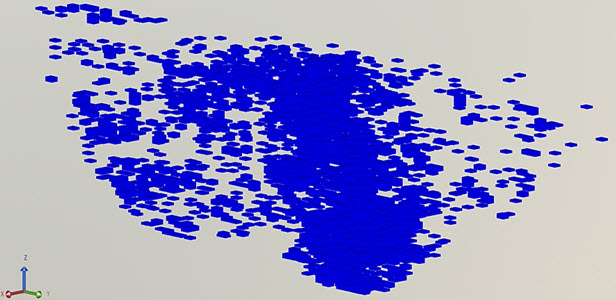
To validate a specific material assignment, set the block model filter expression to match the material’s rule. This effectively shows the blocks assigned to that material.

Block model filter expression: OxCode = "oxide" And Au >= 0.5
The same expression used to assign blocks to the HGOx material
Block model filter expression: OxCode <> "oxide" And Au < 0.5 And Au >= 0.3
The same expression used to assign blocks to the LGSx material
Other examples
Coal and waste
An open cut coal mine contains two materials: Coal and Waste.
Each material is allocated based on ash content:
-
If Ash ≥ 81%, the block is Waste.
-
Otherwise, it’s Coal.
|
Material |
Expression |
Explanation |
|---|---|---|
|
Coal |
Ash < 81 |
Each block must have Ash content that’s below 81%. |
|
Waste |
Ash >= 81 |
Each block must have Ash content that’s equal to or above 81%. |
Iron-grade
The following iron-grade examples illustrate mutually exclusive bins and a Waste fallback.
HG: Fe > 55%, low SiO₂ and Al₂O₃
|
Material |
Expression |
Explanation |
|---|---|---|
|
HG |
RomFe > 55 and |
Each block must have:
|
BG1: Fe > 55% with elevated impurities
|
Material |
Expression |
Explanation |
|---|---|---|
|
BG1 |
(RomFe > 55 and RomSiO2 > 5) |
Each block must have:
|
BG2: Fe 52–55%, low SiO₂, moderate Al₂O₃
|
Material |
Expression |
Explanation |
|---|---|---|
|
BG2 |
(RomFe > 52 and RomFe <= 55) and |
Fe between 52 and 55
|
BG3: Fe 52–55%, low impurities
|
Material |
Expression |
Explanation |
|---|---|---|
|
BG3 |
(RomFe > 52 and RomFe <= 55) and |
Each block must have:
|
BG4: Covers Fe 50–55% with varying impurity levels
|
Material |
Expression |
Explanation |
|---|---|---|
|
BG4 |
(RomFe > 50 and RomFe <= 52)
or
(RomFe > 52 and RomFe <= 55 and RomAl2O3 > 3)
(RomFe > 52 and RomFe <= 55 and RomAl2O3 <= 3 and RomAl2O3 > 2 and RomSiO2 > 3)
or
(RomFe > 52 and RomFe <= 55 and RomAl2O3 <= 2 and RomSiO2 > 5) |
Each block must have:
|
Waste: Remaining blocks with Fe ≤ 50%
|
Material |
Expression |
Explanation |
|---|---|---|
|
Waste |
RomFe <= 50 |
The remaining unallocated blocks must have Fe ≤ 50 |