Evaluation level and evaluation type
When defining principal fields in XECUTE, you can choose how and when expressions are evaluated during reserving calculations. These settings—Evaluation Level and Evaluation Type—determine whether calculations occur at the block level or after aggregation into slices, and whether they apply to the entire slice or per material.
Choosing the right configuration depends on the level of detail you need for reserving, scheduling, and reporting.
Evaluation level
The Evaluation Level specifies the stage at which an expression is applied:
-
Block (default): The expression is evaluated for each block in the block model. Results are then aggregated according to the field’s Aggregation Type (e.g., Sum, Weighted Average).
Use case: When you need precise block-by-block calculations, such as adjusting grades or densities before aggregation.
-
Slice: The expression is applied after blocks are aggregated into slices. This allows calculations to use slice-level attributes, such as PlanArea or AvgThk, which are not available at the block level.
Use case: When calculating drill metres or applying logic based on slice geometry.
Evaluation type (slice-level only)
When Evaluation Level is set to Slice, you can refine how the expression is applied:
-
Slice Total Expression: The expression is applied once per slice, using aggregated values for all materials in that slice.
Example: Calculating a value based on PlanArea and AvgThk for the entire slice.
-
Material-Based Expression: The expression is applied separately for each material within the slice.
Example: Applying different drill spacing for waste vs ore materials.
How evaluation level and type affect results (example)
To understand how Evaluation Level and Evaluation Type work, let’s look at an example using a custom field called auTest. This field uses an expression that simply returns the value of the Au (gold grade) field. The Aggregation Type is set to Max so it returns the maximum value.
We’ll compare how the result changes depending on the evaluation settings.
The original Au principal field configuration |
The AuTest principal field configuration |
||||||||||||||||||||||||||||||||||||||||||
Block level
|
Principal Field (AuTest) |
|
|
Expression |
Au (gets the original Au value) |
|
Evaluation Level |
Block |
|
Evaluation Type |
N/A |
At the Block evaluation level, the expression is applied to each individual block in the block model. (The expression gets the original weight averaged Au value of each block). After that, the aggregation type (in this case, Max) is applied across all blocks in the activity area. This means the result will be the highest single block value in the area.
The image below highlights the block within the activity area with the highest grade. The activity area’s AuTest field inherits that value.
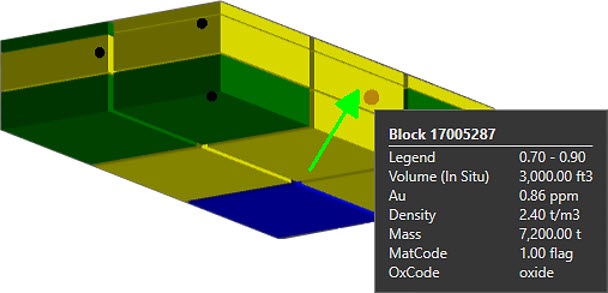
Viewing the attributes of a single block (at the green arrow) within an activity area. The highlighted block and tooltip are of the block with the highest gold grade.
|
Activity Area |
Activity |
Pit |
Au |
auTest |
Mining Level |
|---|---|---|---|---|---|
|
DIG_010 |
Mining |
East Pit |
0.48 |
0.86 |
10m Benches - 1110 |
Various fields of the activity area. The auTest field is 0.86: it gets the maximum Au value of a block within the activity area – because it’s aggregated at the block level.
Slice level – Material-based
Scenario: although material-based, each material uses the same expression
|
Principal Field (AuTest) |
|
|
Evaluation Level |
Slice |
|
Evaluation Type |
Material-based |
|
Material Expressions |
|
|
HGOx Expression |
Au (gets the original Au value) |
|
HGSx Expression |
Au |
|
LGOx Expression |
Au |
|
LGSx Expression |
Au |
|
NAG Expression |
Au |
|
PAG Expression |
Au |
When using Slice level with Material-Based evaluation, the blocks are first grouped into slices. Within each slice, the expression is applied separately for each material. Then, the aggregation type is applied across all slices. Because values are averaged within slices before aggregation, the result is usually lower than the block-level result.
In this example, to determine an AuTest value, the software gets the Au value of blocks, for each material in each slice, then does the Max aggregation (returning the maximum value of the slices). The slice highlighted below (red) has the highest weight average Au – but it’s less than the block evaluation example because it’s evaluated over two blocks.
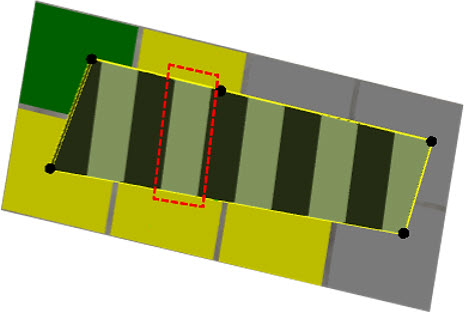
The highlighted slice has the highest weight average Au grade of all slices in the activity area.
|
Activity Area |
Activity |
Pit |
Au |
auTest |
Mining Level |
|---|---|---|---|---|---|
|
DIG_010 |
Mining |
East Pit |
0.48 |
0.8193 |
10m Benches - 1110 |
Because there are fewer slices in the activity area, each one covers a larger area and includes more blocks. This often brings in blocks with lower Au values (like the green block in the upper left), which reduces the overall value after aggregation (the maximum in this case)
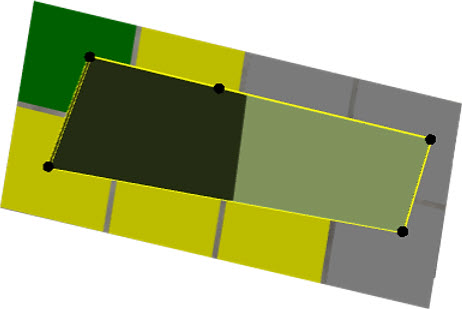
|
Activity Area |
Activity |
Pit |
Au |
auTest |
Mining Level |
|---|---|---|---|---|---|
|
DIG_010 |
Mining |
East Pit |
0.48 |
0.7885 |
10m Benches - 1110 |
Scenario: Each material uses a different expression
In this other scenario, each material within a slice uses its own expression.
|
Principal Field (AuTest) |
|
|
Evaluation Level |
Slice |
|
Evaluation Type |
Material-based |
|
Material Expressions |
|
|
HGOx Expression |
1 |
|
HGSx Expression |
2 |
|
LGOx Expression |
3 |
|
LGSx Expression |
4 |
|
NAG Expression |
5 |
|
PAG Expression |
6 |
For example, PAG is assigned a value of 6, while other materials have different constants. The expression is evaluated per material in each slice, and then the Max aggregation is applied across all slices.
Because PAG appears in at least one slice, its value (6) becomes the maximum for the entire activity area even if other slices contain lower values.
|
Activity Area |
Activity |
Pit |
Au |
auTest |
Mining Level |
|---|---|---|---|---|---|
|
DIG_010 |
Mining |
East Pit |
0.48 |
6.0000 |
10m Benches - 1110 |
Slice level – Slice total
When you choose Slice Total, the blocks are grouped into slices, and your expression (for example, referencing the original Au field) is applied once per slice using all blocks in that slice. It does not calculate separately for each material. After that, the chosen aggregation type (such as Max) is applied across all slices.
Examples
Pincipal Fields \ Au
|
Principal Field (AuTest) |
|
|
Expression |
Au |
|
Evaluation Level |
Slice |
|
Evaluation Type |
Slice Total |
The expression returns the weight-averaged Au value for all blocks in each slice, then aggregates the slices using Max.
Material Fields \ LGSx_Au
|
Principal Field (AuTest) |
|
|
Expression |
LGSx_Au |
|
Evaluation Level |
Slice |
|
Evaluation Type |
Slice Total |
The expression returns the weight-averaged Au value for all blocks of the LGSx material in each slice, then aggregates using Max. As expected, the maximum Au is lower because it only considers the lower-grade material.
Area Fields \ Area_Total_Au
|
Principal Field (AuTest) |
|
|
Expression |
Area_Total_Au |
|
Evaluation Level |
Slice |
|
Evaluation Type |
Slice Total |
The expression returns the weight-averaged Au value for all blocks in the entire activity area. This is effectively the same as the block-level aggregation for the Au field.
Summary of expression field availability
This table and quick list below explain which field categories you can reference when building expressions for principal fields, based on the field’s configuration. They shows how Aggregation Type, Evaluation Level, and Evaluation Type affect the availability of different field categories (such as Principal Fields, Name Fields, Material Fields, and Area Fields) and whether spatial fields (like PlanArea or AvgThk) can be used.
Quick guide
Block level (any aggregation)
-
You can use Principal Fields and Name Fields.
-
Spatial fields (PlanArea, AvgThk, etc.) are not available.
Slice level – Slice total expression
-
You can use Principal Fields, Name Fields, Material Fields, and Area Fields.
-
Spatial fields are available.
Slice level – Material-based expression
-
You can use Principal Fields and Name Fields.
-
Spatial fields are not available.
Aggregate
-
You can use Principal Fields and Name Fields.
-
Spatial fields are not available.
-
Cannot be used in objectives or Product Optimiser.
Full table
|
Aggregation Type |
Evaluation Level |
Evaluation Type |
Field Category Available |
Spatial Fields Available? |
Notes |
|---|---|---|---|---|---|
|
None, Sum, Min, Max, Weight Average |
Block |
N/A |
Principal Fields, Name Fields |
N/A |
Only Sum and Weight Average types can be used in objectives. |
|
None, Sum, Min, Max, Weight Average |
Slice |
Material-Based and Slice Total expression |
Principal Fields |
Only for Slice Total Expression evaluation type |
Slice evaluation level fields are not available for use in objectives. |
|
None, Sum, Min, Max, Weight Average |
Slice |
Material-Based and Slice Total expression |
Name Fields |
N/A |
|
|
None, Sum, Min, Max, Weight Average |
Slice |
Slice Total expression |
Material Fields |
N/A |
|
|
None, Sum, Min, Max, Weight Average |
Slice |
Slice Total expression |
Area Fields |
N/A |
|
|
Aggregated Evaluation |
(Evaluated at level used) |
N/A |
Principal Fields, Name Fields |
No |
Aggregated Evaluation fields are not available for use in objectives. |