Equipment Function Settings
XERAS Cloud has a range of specialised calculation functions used to derive various equipment fleet numbers and maintenance costs, for example @EREPU (equipment replacement), @ENEWU (new units), and @EMEVENT (fleet maintenance costs). Many of these equipment functions use settings that control the logic applied within the calculation, which are set as model-level properties.
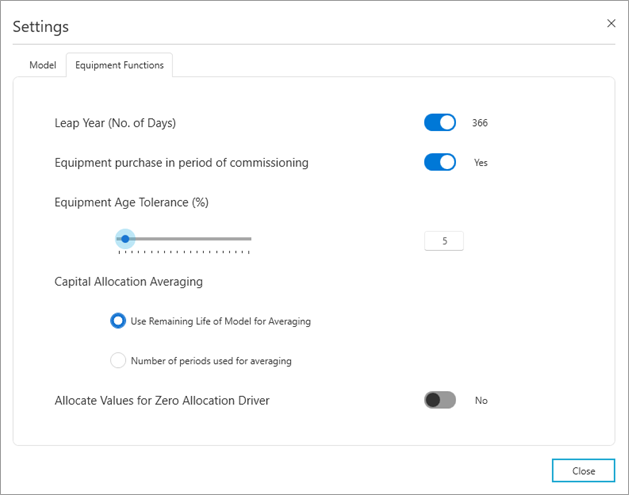
To change Equipment Function properties:
-
Click Administration mode > Model Management.
-
Select the model from the list.
-
Click Settings.
-
Click the Equipment Functions tab.
-
Edit the properties as required.
-
Click Apply.
-
Click Close.
The Equipment Functions properties are:
| Leap Year |
Set the number of days used in the calendar table and calculation functions for each leap year. The default is 366 days. |
| Equipment Purchase in Period of Commissioning |
Controls the timing of new and replacement equipment purchases that are calculated in the @ENEWU, @EREPU, and @EREPU2 functions. Yes = The functions assign the equipment purchases in the period in which the equipment units are required, that is, the period of commissioning. No = The functions assign the equipment purchases in the period prior to when the equipment units are required, that is, the period before commissioning. |
| Equipment Age Tolerance |
To determine the replacement timing for equipment units in the @EREPU and @EREPU2 functions, the forecast age of each underlying unit is calculated at the end of each period. The calculated age is then compared to the age limit parameter. If the forecast age is lower than the age limit, the equipment will not be replaced. However, this Equipment Age Tolerance allows units that are very close to the age limit, that is, within the tolerance amount, to be replaced early, rather than assuming the equipment will run significantly over the age limit. The equipment age tolerance is a percentage that is applied to the unit operating hours for the following period. The result is subtracted from the replacement age limit to create an adjusted age limit at the end of each period. If the forecast equipment age is higher than the adjusted age limit, the unit will be replaced. Adjust the equipment age tolerance using the slider or entering the percentage. |
| Capital Allocation Averaging |
Sets the number of periods used in the Capital Allocation calculation logic. Options are:
|
| Allocate Values for Zero Allocation Driver | Toggle setting that enables the built-in allocation logic to allocate costs even if the allocation driver is zero. |