Expandable rows in spreadsheets
Expandable rows enable flexibility in model and template design to help address the problem of having to create a template with the maximum number of possible rows to be used by any individual spreadsheet associated with that template.
An expandable row is designed such that only one single row is required to be set up within the template. Then, at the spreadsheet level, users can add copies of that template row as required for that section in that specific worksheet. The spreadsheet will use the same underlying template row for each linked expandable row and will automatically append an index number (for example, #1) to the template row code, in order to specifically identify each spreadsheet expandable row.
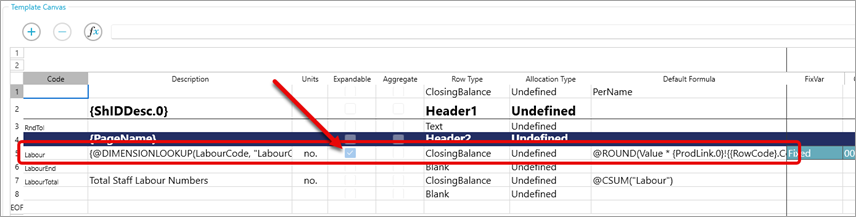
The screenshot below shows an example of how to set up an expandable row within a template. The row code should not include any numbering as this will be added automatically. The Expandable row checkbox should be selected.
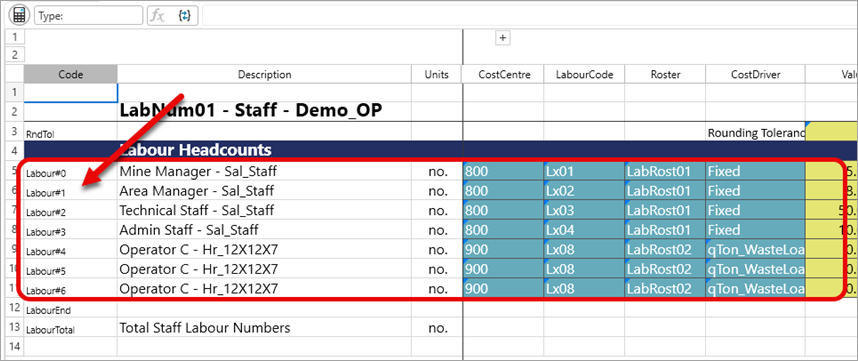
The next screenshot shows an example of using the expandable rows within a spreadsheet, including the row index that is automatically appended to the new code.
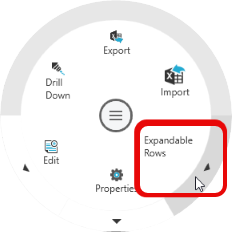
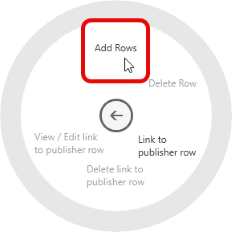
To add an expandable row into the spreadsheet, right-click on the base row (with index #0), select Expandable Rows, then select Add Rows.
|
|
Multiple sections of expandable rows can be linked together such that if you add or delete rows from the primary expandable row section (called the Publisher Row), the linked expandable rows will be automatically synchronised with the same number of rows and using the same row indexes.
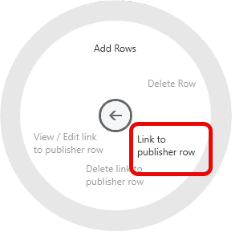
Expandable rows dial
Right-click in the code column to display the dial.
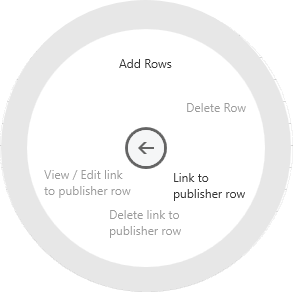
| Item | Description |
|---|---|
| Add Rows | Adds expandable rows. |
| Delete Row | Deletes the expandable row. |
| Link to publisher row | Enables the current expandable row to automatically add or delete rows based on the number of rows added to the Publisher row. |
| Delete link to publisher row | Removes the link to the Publisher row, meaning the current expandable row will return to a manual add and delete state. |
| View/Edit link to publisher row | View or Edit the details of the linked Publisher expandable row. |