Spreadsheet access control
Users will have access to spreadsheets via their model/user view permissions, unless specific permissions are added to the spreadsheet property to restrict access. Then, only users in the specified groups will have access.
To restrict access to a specific spreadsheet within a XERAS model:
-
Open a model in Construct mode.
-
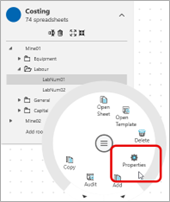
Expand the structure and click the spreadsheet you want.
-
Right-click and select Properties, or press F2.
-
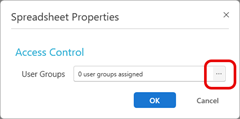
In the Access Control > User Groups field, click the Ellipses.
-
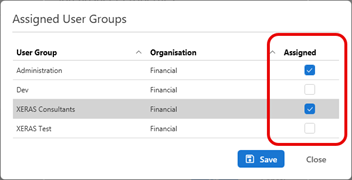
Select the relevant check boxes to assign the user groups that will have access to the spreadsheet.
-
Click Save.
Once this access control is applies, only the user groups assigned will be able to access the spreadsheet in either Use or Construct modes. All other user groups will not have permission to view or edit this spreadsheet.