Navigation
The AMT Home screen is divided into the following areas.
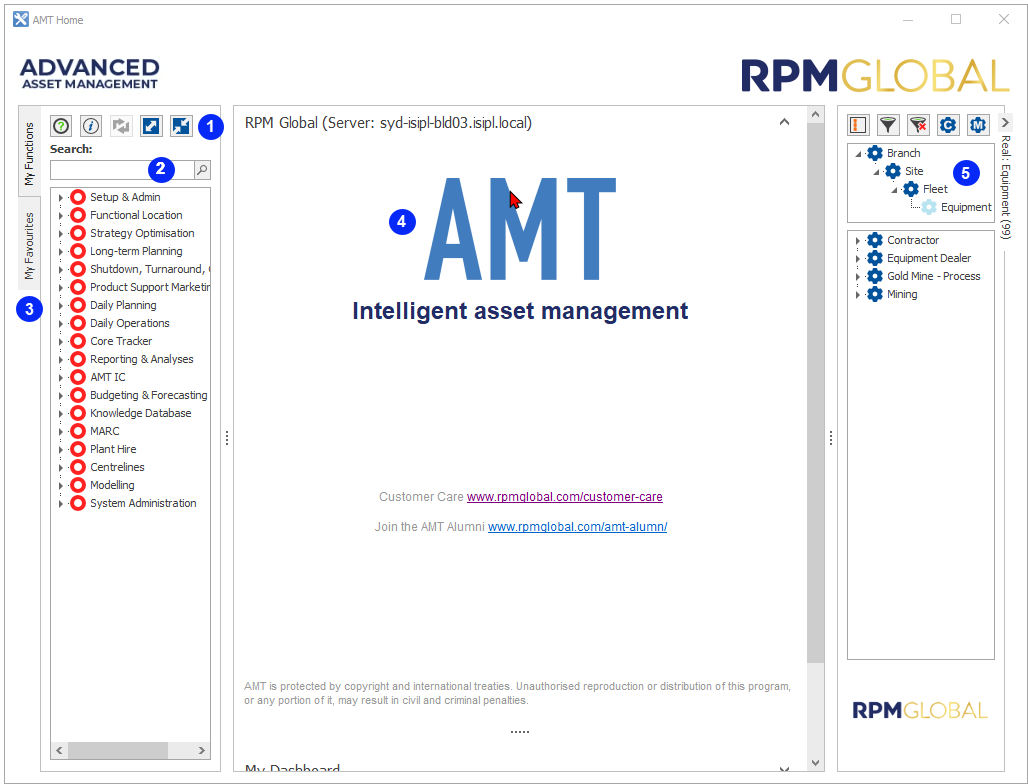
| Number | Description |
|---|---|
| 1 | My Functions |
| 2 | Search Bar |
| 3 | My Favourites |
| 4 | Information Panel |
| 5 | Equipment Navigator |
My Functions
My Functions gives you all functionality as per your access level.
The My Functions tab is where you can launch all functions and reports. Find the function you want by drilling down into the branch structure.
Alternatively, you can navigate to functions and reports using the Search Bar. Enter the name, or part of the name, of the function or report you are searching for.
The My Favourites tab is where you can see your favourite reports and functions, and preselected functionality. See My Favourites for more information.
Information Panel
The Information Panel provides you with information about the AMT version that is currently installed. You can also view the My Dashboard, Quick Watch and Notifications functions by clicking the relevant arrow to the right.
Equipment Navigator
The Equipment Navigator displays a list of all assets according to a pre-populated hierarchy. You can display the asset information in two ways.
- Grouped by various categories: Fleet, Model, Site and so on. Filters are then available to limit the results:
- Group by - Refers to how the data is grouped.
- Equipment Hierarchy - These filters give you the flexibility to limit, very specifically, the data that displays in the reports.
Click Filter
 at the top of the panel. The Equipment Editor displays.
 The default filter is Group By Branch, Site, Fleet . You can clear that filter, then click the Search icon to select the items you want to filter on.
- Listing Standard/Child Assets.
- Click Change to siblings/Change to standard
 to toggle between Standard and Child Assets.
- Click Filter at the top of the panel. The Equipment Selector displays. You can select the parent equipment and associated filters.
- Click Change to siblings/Change to standard
To set up the Equipment Navigator follow these links:
Below are the icons used in My Functions, My Favourites and Equipment Listing areas of AMT’s home screen.
| Item | Description |
|---|---|

|
Function List - Menu Header |

|
Function List – Sub-Menu Header |

|
Function List – Working Screen |

|
Function List – Report |

|
Equipment List – Group By |

|
Equipment List – Analyse By |