The Simplification Settings dialog box displays.
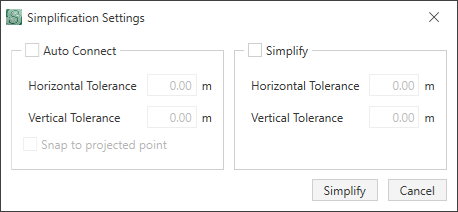
The Simplify Roads function (in the Tools section on the Ribbon) is useful when multiple nodes are used to build a road or if there is a break in the road. You can auto connect a road if there is a break in the road or to merge multiple nodes together.
Multiple nodes can be selected at the same time by
- selecting Select > Rectangle
- selecting a node and holding down the Ctrl key and selecting each node
- selecting a range by Shift + clicking the first road segment in the range, and then Shift + clicking the last road segment in the range.
Given the scenario below:

There are two nodes for the Auto Connect functionality: